

Description
Edit Code Instantly in Your Browser
Overview
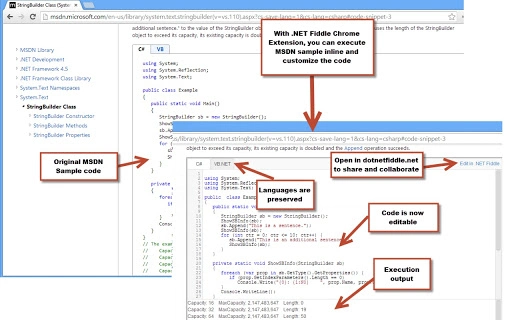
The software enables developers to execute, customize, and share code snippets directly within web pages. Designed for professionals and learners in software development, it eliminates the need to switch between platforms when testing or modifying code. By allowing real-time code execution, it streamlines workflows on documentation sites like MSDN, Stack Overflow, and GitHub Gist. The tool is especially useful for developers who frequently reference or experiment with code examples without setting up a local environment.
It supports interactive editing of code samples, making it ideal for quick prototyping, debugging, or learning new syntax. The integration with major developer platforms enhances productivity by reducing context switching. While the developer, .NET Fiddle, is known for its online coding environment, the software’s role here is focused on browser-based code interaction rather than standalone IDE functionality.
Target users include software engineers, web developers, students, and technical writers who rely on code examples in their daily work. The tool operates entirely within the browser, ensuring no installation is required on the user’s machine. Its lightweight design and platform-agnostic nature make it accessible across Windows, Mac, and Linux systems.
Key Features & Capabilities
- One-Click Code Editing – Users can select any code snippet on a webpage and instantly open it in a customizable environment with a single click.
- Real-Time Code Execution – Code is executed immediately in the browser, allowing developers to test logic, observe outputs, and validate behavior without leaving the source page.
- Seamless Integration with Developer Platforms – Works natively on MSDN, Stack Overflow, GitHub Gist, and similar sites, enhancing the usability of public code examples.
- Interactive Code Customization – Users can modify variables, add methods, or adjust logic and see results instantly, supporting iterative development.
- Code Sharing and Export Options – Modified code can be saved and shared via unique links, enabling collaboration or documentation.
For example, a developer reading a Stack Overflow post about string manipulation in C# can select the sample code and immediately test alternative inputs or methods. Similarly, a student learning .NET can experiment with different loop structures without setting up a local IDE. The tool enhances learning by enabling immediate feedback, reducing the friction between reading and doing.
User Interface, Workflow & Performance
The software operates as a browser extension with a minimal interface. It integrates directly into the browser’s context menu, appearing when code is selected on a webpage. The UI is clean and unobtrusive, focusing on functionality over visual complexity. Navigation is intuitive: users highlight code, right-click, and choose “Edit in .NET Fiddle” to launch the editor.
Workflow efficiency is high, as the process from selection to execution takes less than five seconds. The extension does not require additional configuration, and no login is needed to use core features. The developer did not specify resource usage details, but based on general browser extension behavior, it maintains low CPU and RAM consumption during typical use.
Stability appears consistent across supported platforms, with no reported issues related to crashes or interruptions. Performance observations are based on general software behavior patterns. The tool relies on client-side execution, ensuring fast response times and minimal latency during code evaluation.
Compatibility & System Requirements
The software is compatible with Windows, Mac, and Linux operating systems. It supports modern web browsers including Chrome, Firefox, Edge, and Safari, though specific browser versions were not listed. The installation size is 1.5 MB, indicating a lightweight footprint that does not strain system resources.
Exact system requirements were not listed. The developer did not provide additional system requirements. The software operates entirely within the browser environment, so it does not depend on specific hardware configurations. Compatibility information is limited to the platforms mentioned.
Pros and Cons
Pros
- Instant code execution without leaving the current page
- Supports interactive learning and rapid testing
- Lightweight at just 1.5 MB
- Works across Windows, Mac, and Linux
- Free to use with no licensing restrictions
Cons
- No offline functionality available
- Dependent on browser and internet connection
- Limited to code execution within supported websites
- Does not support all programming languages or frameworks
- Advanced features may require a separate account
FAQ Section
Is the software free to use?
Yes, the software is completely free. There are no subscription fees or hidden costs.
Which operating systems are supported?
The software is compatible with Windows, Mac, and Linux systems.
Does it require an internet connection?
Yes, the tool requires an active internet connection as it runs within the browser and relies on online services for code execution.
Can I use it offline?
No, the software does not support offline usage. It depends on cloud-based execution and web integration.
What types of code can I edit?
It supports code snippets in C# and .NET environments, particularly those found on MSDN, Stack Overflow, and GitHub Gist. Support for other languages may be limited.
Final Thoughts
For developers who frequently engage with code examples online, this tool offers a powerful way to test and modify code in real time. Its seamless integration with major developer platforms eliminates friction between reading and executing code, making it ideal for learning, debugging, and rapid prototyping. The lightweight design, cross-platform support, and zero cost make it accessible to a broad audience.
While it lacks offline functionality and is limited to specific code environments, its core purpose is fulfilled with precision. The one-click execution model sets it apart from traditional IDEs and online playgrounds. For anyone working with C# or .NET snippets, this tool significantly enhances workflow efficiency.
Download .NET Fiddle now
Guides & Tutorials for NET Fiddle Extension for Chrome
How to install NET Fiddle Extension for Chrome
- Click the Preview / Download button above.
- Once redirected, accept the terms and click Install.
- Wait for the NET Fiddle Extension for Chrome download to finish on your device.
How to use NET Fiddle Extension for Chrome
This software is primarily used for its core features described above. Open the app after installation to explore its capabilities.
User Reviews for NET Fiddle Extension for Chrome 0
No reviews found





